See exactly what changed in your PDFs and JSON files.

A lightweight, fully offline Windows tool that compares PDF and JSON files in batch, highlights every difference, and exports a shareable report.

Text-based PDF comparison. Not for scanned or image-only PDFs.

One-time payment · lifetime updates · no subscription

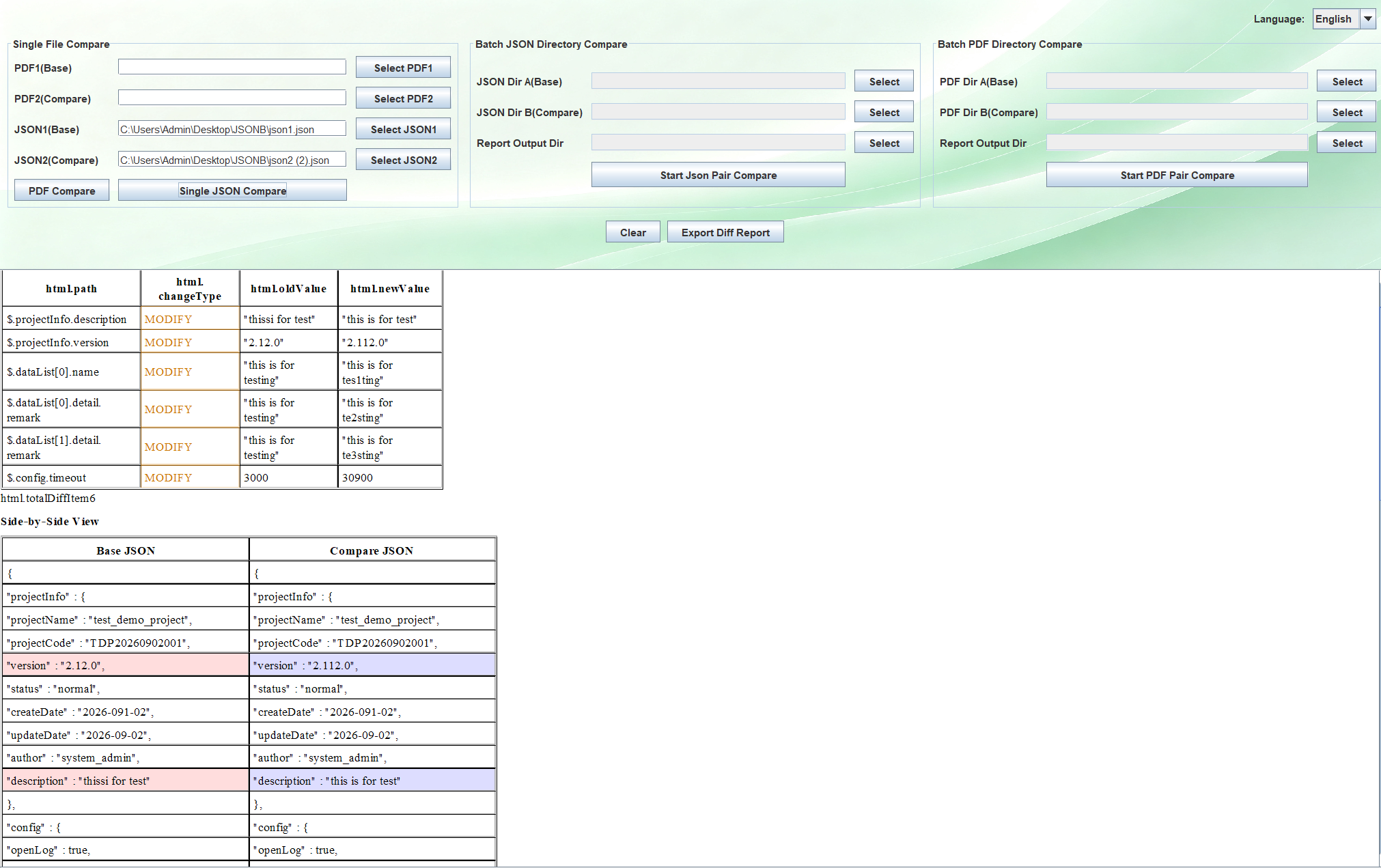
PJCompare interface - comparing PDF and JSON files side by side

PJCompare · side-by-side comparison view

FEATURES

Built for test automation and batch validation

Stop opening file after file. PJCompare compares whole sets of files and tells you what actually changed.

JSON diff

Compare two JSON files side by side. Added, removed and changed keys are color-coded instantly.

PDF diff

Compare two PDF documents at text level. Changes are highlighted in a clean side-by-side view.

Batch folder compare

Point at two folders and compare every matching PDF or JSON pair in one run, with live progress.

Export HTML report

Turn any comparison into a clean HTML report you can share with your team or keep as proof of change.

WHY IT EXISTS

Made for QA engineers who need answers, not noise

Most compare tools force you to ignore timestamps, IDs and formatting every single time. PJCompare is built around the way test automation actually works.

100% offline

Your files never leave your machine. No cloud, no uploads, no sign-up. Sensitive test output stays private.

Drag & drop

Drop files or folders straight into the window. No tedious file picking, no setup to learn.

English & Chinese UI

Switch the interface language anytime to match your team.

Single purchase

One-time payment, lifetime updates for this version. No recurring fees.

WORKFLOW

From two folders to a diff report in under a minute

Drop in your files

Drag two PDFs, two JSONs, or two folders into the window. PJCompare matches files by name.

Run the comparison

Click compare. Batch runs show a live progress bar and a log of each file pair as it finishes.

Review the differences

Changes appear side by side, color-coded, so you can tell at a glance what moved.

Export and share

Save the result as an HTML report to hand to your team or attach to a ticket.

PRICING

Simple, one-time pricing

No subscriptions, no hidden fees. Buy once and keep the tool forever.

Try before you buy
Free
Evaluation build
  • Try the full workflow
  • See if it fits your process
  • Then unlock everything
Download Trial

Not sure it fits? Contact me before buying and I'll help you confirm whether PJCompare matches your use case. Refunds are available within 30 days if it doesn't work for you.

FAQ

Questions, answered

Which operating systems are supported?

Windows 10 and Windows 11, 64-bit. This is a Windows desktop app.

Is it a one-time purchase?

Yes. You pay once and get a perpetual license with lifetime updates for v1.x.

Does it compare scanned or image PDFs?

No. PJCompare works on text-based PDFs. If your PDFs are scanned images, use an OCR step first to extract text, then compare.

Why does Windows show an “unknown publisher” warning?

This is a false positive from bundling the Java runtime. The tool is safe. Click “More info” then “Run anyway” to install.

Are my files uploaded anywhere?

No. PJCompare runs 100% offline. Your PDF and JSON files never leave your computer.

Do you offer refunds?

Yes. If the tool doesn't work for your use case, contact me within 30 days for a full refund.
OPEN SOURCE

License transparency

This software includes several open-source libraries. The full license texts and third-party notices are bundled with the installer. After installation, see THIRD-PARTY-NOTICES.txt in the install directory.